
PoE 2 1.0 Full Release Comprehensive Beginner's Guide - Everything Exiles Need to Know
Path of Exile 2 1.0 Full Release is coming soon. If you're starting fresh on launch day, reading this guide will save you dozens of hours of trial and error.
In Path of Exile 2, the trading system is highly dynamic, allowing almost every item to be bought and sold. While this opens up countless opportunities for profit, it also makes determining an item's true value a challenging task. Accurate price-checking is crucial to maximize your earnings and ensure that rare or high-demand items aren't sold for less than they're worth. This guide will provide you with the knowledge and tools to price-check items, list them effectively, and navigate the game's complex economy with confidence.
Path of Exile 2’s intricate trading system requires a solid understanding of item values to succeed. Without proper price-checking, you risk either undervaluing rare treasures or setting prices too high for items that won’t sell. Mastering this process is essential for efficient trading and maintaining a competitive edge in the marketplace. Let's dive into how to price-check items effectively.
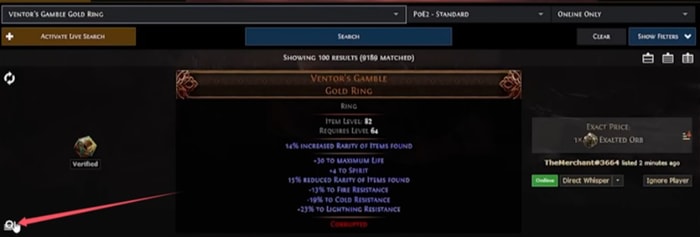
To determine a PoE 2 item’s worth, visit the trade site (pathofexile.com/trade2) and search for similar items. Adjust the stats to match your item’s attributes. For example, if you want to check the item Ventor’s GambleStats include lightning resistance and raritySearch its name instead of entering each statThen click the button to populate the search with its stats, simply search for "Ventor’s Gamble" instead of entering all stats individually (e.g., lightning resistance, rarity, etc.). Then, clicking the button shown in the figure will populate the search with the item's stats.
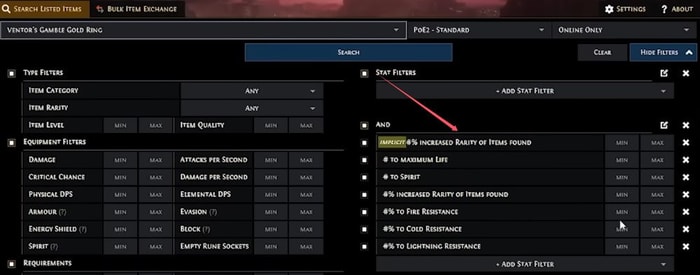
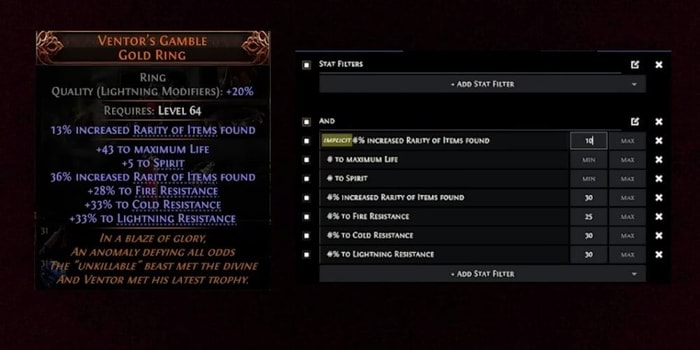
If the rarity on the bottom is 36, we put 30; if fire resistance is 28, we put 25. Repeat for other attributes. This allows you to find comparable items and set a realistic price.
If your item has no comparable listings on the trade site, it’s likely unique. You have two options:
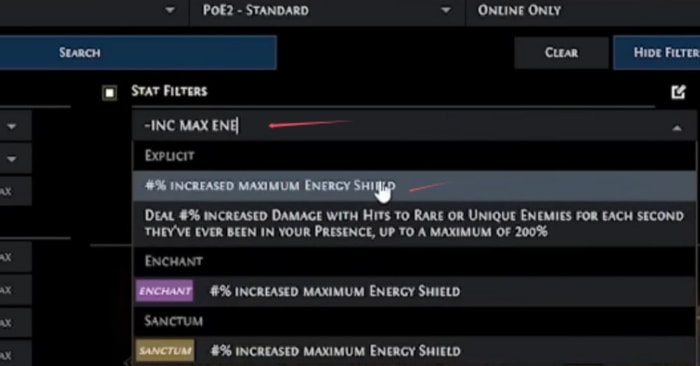
If you use this tilde sign (~) in front of your search, you don't have to type out the entire phrase perfectly. For example, if you want to search for "increased maximum energy shield" on a jewel, you would normally have to type the full phrase. But with the tilde sign, you can just type "~inc Max Energy" and it will find it.
After determining the item’s price, follow these steps to list it for sale:
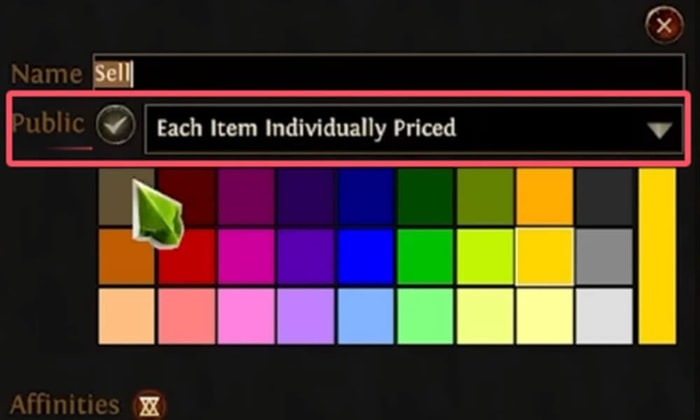
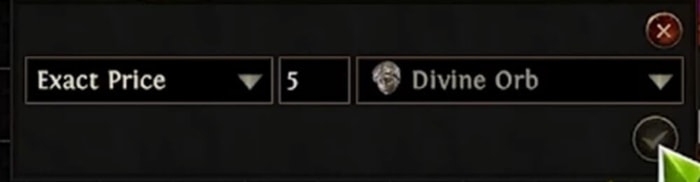
If you don't want to price check each item individually, you can dump them into a multi-divine tab. For example, you can set the tab to five divines, and if nothing sells, lower it to four divines the next day. This way, you can gradually find the right price for your items.
What is Price Fixing? Price fixing happens when someone lists items at fake low prices to manipulate the market. For example, you search for "Hand of Wisdom and ActionGlovesExample: listings for 5 divines, but most are priced at 7 divinesThe 5 divine listings are likely price fixers" gloves and see listings for 5 divines. However, scrolling down reveals most are priced at 7 divines. The 5 divine listings are likely price fixers.
If you receive multiple offers immediately after listing an item, it may be underpriced. Recheck the actual market value to avoid falling for this trick.
Recommended Tool: Exile Exchange 2
Third-party tools can streamline price-checking. Exile Exchange 2 is an excellent open-source option available on GitHub. Here’s how to use it:
If you want to buy something with ExaltsExalted OrbsAdjust the trade filter to show Exalted Orb prices instead of Divine OrbsExalt listings are especially useful for rare itemsThe trade site doesn’t allow fractional prices but only see Divine listings, it’s likely due to the trade site lagging behind the divine-exalt ratio. To find exalt listings, scroll down manually or adjust the trade filter to show Exalted Orb prices instead of Divine Orbs.
Finding exalt listings is especially useful for rare items, as the trade site doesn’t allow fractional prices (e.g., 1.2 Divines).
Short on Divines or Exalts? If you don’t have enough of the currency an item is listed in, you can also buy PoE 2 currency.
Buy PoE 2 CurrencyWith these strategies, you can confidently price-check and list your items in Path of Exile 2. Whether you’re handling common loot or unique treasures, understanding the market is essential to maximizing your profits.
Visit the trade site (pathofexile.com/trade2), search for similar items and adjust the stats to match your item’s attributes. For example, search for Ventor’s Gamble by name and click the button that populates the search with its stats. Then adjust the values: if the rarity is 36, put 30; if fire resistance is 28, put 25.
Obtain a Premium Stash Tab by purchasing one or upgrading an existing stash tab using 15 coins, which are included in Early Access packs. Place the item in the tab and set the tab to public, then right-click the item and input your desired price (e.g., 5 divines). It will appear on pathofexile.com/trade2.
If your item has no comparable listings on the trade site, it’s likely unique. The faster method is to list it in a public tab without setting a price and accept the offer you’re happy with. Alternatively, list it at a high price and gradually lower it until someone buys it.
Price fixing happens when someone lists items at fake low prices to manipulate the market. For example, if Hand of Wisdom and Action gloves show listings for 5 divines but scrolling down reveals most are priced at 7 divines, the 5 divine listings are likely price fixers. If you receive multiple offers immediately after listing an item, it may be underpriced.
The recommended tool is Exile Exchange 2, an excellent open-source option available on GitHub. Press Ctrl + Alt + D on an item to instantly check its price or populate the trade site with relevant stats. Avoid logging into tools that require your Path of Exile credentials, never reuse your PoE password, and avoid apps like PoE Overlay that require Overwolf.
It’s likely due to the trade site lagging behind the divine-exalt ratio. Scroll down manually or adjust the trade filter to show Exalted Orb prices instead of Divine Orbs. This is especially useful for rare items, as the trade site doesn’t allow fractional prices (e.g., 1.2 Divines).
Path of Exile 2 1.0 Full Release is coming soon. If you're starting fresh on launch day, reading this guide will save you dozens of hours of trial and error.

In this guide, we'll walk you through the registration process, explain how rewards are distributed, and answer the most important questions players have about the promotion.

The Forbidden Event in Path of Exile 2 is ruthless, unpredictable, and packed with deadly modifiers that can erase glass-cannon builds in seconds. Today I'm going to show five builds for those who like to stand still and never die.

Today MmoGah will show you Daniel’s helpful video about PoE 2 0.5.5 builds. I brought you top four builds for those who already got a lot of Divine Orbs and want to destroy the high-endgame without any effort. These four builds are: Thunder Stalker Mercenary Gemling Legionnaire, CoC Sparkomet Druid Oracle, Frost Reaper Druid Oracle, and Voltaic Nemesis Mercenary Gemling Legionnaire.