
Lost Ark: World Tree Leaves Collectibles Guide
How to collect World Tree Leaves in Lost Ark through life skills, merchants and quests, plus every reward from 6 to 120 Leaves.
Lost Ark is an MMORPG co-developed by Korean developer Tripod Studio and Smilegate RPG. In this game, you will be playing as one of the heroes in Arkesia; with darkness threatening the world, you embark on a quest to seek out The Ark: an item that many people believe is just a fairy tale, but which is now this world’s only salvation.
It has four major currencies: Lost Ark Gold, Silver, Royal Crystals and Crystals. Regarding classes, you can choose between 5 base classes with 15 different sub-classes, each of them having totally different fighting styles and in-depth customization options. Explore a big and engaging world, whether solo, in a group with friends, or matched up with other adventurers; there’s an epic adventure waiting for you. Stats is an important system in Lost Ark. Today, we will introduce some basic information for new players.
This guide was written in 2022, so some details may have changed since.
Stats is a system that contains a series of attributes and traits a character possesses in Lost Ark. These traits and attributes reflect a particular character’s performance during gameplay, like attack speed, damage, resistance or field healing. These numbers are displayed as a percentage, which indicates the change compared to the default stats value. And naturally, a character with a higher stat value always experiences advantages in almost any aspect of the gameplay.
The stats screen can be found in the Character info section, under the “Equipment” tab, and it can also be accessed by pressing the “P” key by default. All the stats in the info screen are divided into three groups: Attack, Defense and Activity.
Note: Be advised that some stats in these three groups are exclusive to certain classes. For example:
There are eight fundamental stats for a character, and they are divided into two types on the info screen: Basic and Combat Stats. All the fundamental stats and what they indicate are as follows:
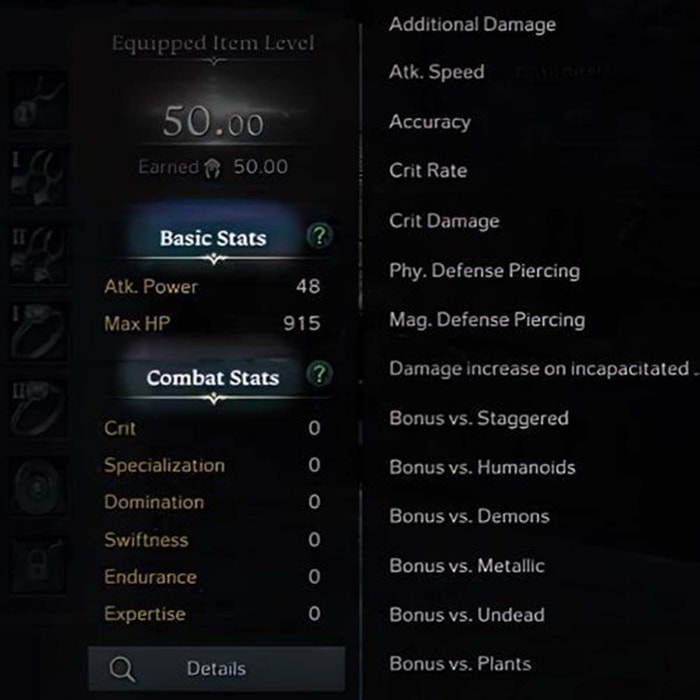
The following table contains information for every stat in the game so far.
| Stats Name | Stats Type | Class |
|---|---|---|
| Strength | Attack | Warrior, Martial Artist |
| Dexterity | Attack | Assassin, Gunner |
| Intelligence | Attack | Mage |
| Weapon Power | Attack | All Classes |
| Additional Damage | Attack | All Classes |
| Atk Speed | Attack | All Classes |
| Accuracy | Attack | All Classes |
| Crit Rate | Attack | All Classes |
| Crit Damage | Attack | All Classes |
| Phy. Defense Piercing | Attack | All Classes |
| Mag. Defense Piercing | Attack | All Classes |
| Damage Increase on Incapacitated | Attack | All Classes |
| Bonus vs. Staggered | Attack | All Classes |
| Bonus vs. Humanoids | Attack | All Classes |
| Bonus vs. Demons | Attack | All Classes |
| Bonus vs. Metallic | Attack | All Classes |
| Bonus vs. Undead | Attack | All Classes |
| Bonus vs. Plants | Attack | All Classes |
| Bonus vs. Insects | Attack | All Classes |
| Bonus vs. Elementals | Attack | All Classes |
| Bonus vs. Beasts | Attack | All Classes |
| Bonus vs. Machines | Attack | All Classes |
| Bonus vs. Ancients | Attack | All Classes |
| Bonus vs. Gods | Attack | All Classes |
| Bonus vs. Archdemons | Attack | All Classes |
| Debuff Time Bonus | Attack | All Classes |
| Stagger Damage | Attack | All Classes |
| Vitality | Defense | All Classes |
| Vigor | Defense | All Classes |
| Phy. Defense | Defense | All Classes |
| Mag. Defense | Defense | All Classes |
| Phy. Damage Reduction | Defense | All Classes |
| Mag. Damage Reduction | Defense | All Classes |
| Dodge Rate | Defense | All Classes |
| Crit Resistance | Defense | All Classes |
| Combat HP Recovery | Defense | All Classes |
| Resisting HP Recovery | Defense | All Classes |
| Shield | Defense | All Classes |
| Healing | Defense | All Classes |
| Debuff Time Reduction | Defense | All Classes |
| Max MP | Activity | All Classes |
| Awakening Skill Damage | Activity | All Classes |
| Combat MP Recovery | Activity | All Classes |
| Resting MP Recovery | Activity | All Classes |
| Move Speed | Activity | All Classes |
| Mount Speed | Activity | All Classes |
| Encumbered Speed | Activity | All Classes |
| Skill Cooldown Speed | Activity | All Classes |
| Fury Meter Gain | Activity | Berserker |
| Burst Duration | Activity | Berserker |
| Blood Rush Damage | Activity | Berserker |
| Shield Meter Recovery Amount | Activity | Gunlancer |
| Battlefield Shield Amount Increase | Activity | Gunlancer |
| Increase Normal Skill Damage | Activity | Gunlancer |
| Increase Holy Aura Effect | Activity | Paladin |
| Piety Meter Gain | Activity | Paladin |
| Serenade of Salvation Recovery | Activity | Bard |
| Serenade of Courage Effectiveness | Activity | Bard |
| Serenade Meter Gain | Activity | Bard |
| Elemental Damage Efficiency | Activity | Sorceress |
| MP Meter Gain | Activity | Sorceress |
| Esoteric Skill Damage | Activity | Wardancer, Striker |
| Esoteric Meter Gain | Activity | Wardancer, Striker |
| Shock Skill Damage | Activity | Scrapper |
| Stamina Recovery | Activity | Scrapper |
| Hype Effectiveness | Activity | Soulfist |
| Spirit Recovery Time Reduction | Activity | Soulfist |
By this point, you might wonder: since stats are an essential part of the gameplay, how do you improve them? Well, just like in other MMORPGs, you can improve your stats by wearing better armor and accessories. Each piece can have positive and/or negative effects on different stats. And accessories and armor can influence your stats in two separate ways as well (depending on the item).
In addition to the stats provided by armor, you can upgrade your armor to gain an even higher stats number than your current amount. This can be done with Craftsmen NPCs.
Warning: Accessories cannot be improved by crafting. So their effects on stats are determined by their initial attributes and Engraving levels, and nothing can be changed after you have acquired a particular item.
The stats screen is in the Character info section, under the “Equipment” tab. You can also open it by pressing the “P” key by default.
There are eight: the Basic Stats Attack Power and Max HP, and the Combat Stats Crit, Specialization, Domination, Swiftness, Endurance and Expertise.
Swiftness is a primary indication of Attack Speed, Movement Speed and Skill cooldown decrease.
Strength is for Warrior and Martial Arts classes, Dexterity for Gunner and Assassin classes, and Intelligence for the Mage class.
No. Armor can be upgraded with Craftsmen NPCs, but accessories cannot be improved by crafting; their stats come from their initial attributes and Engraving levels.
How to collect World Tree Leaves in Lost Ark through life skills, merchants and quests, plus every reward from 6 to 120 Leaves.

A Lost Ark Elixir System guide covering how to acquire, craft and refine Elixirs, effect types and the Maxroll.gg simulator.

A PvE Wind Fury Aeromancer build for Lost Ark: skill build, engravings, combat stat targets, gems and gear, built around Swiftness and Reversal skills.

How Lost Ark bracelets work: where to obtain them, how re-rolling and locking effects works, upgrading from relic to ancient grade, and choosing stats by class and role.