
Monopoly Go New Season “MONOPOLY Ever After” – Full Guide, Rewards & Best Strategy
The brand-new season MONOPOLY Ever After has officially arrived, bringing a magical fairytale twist to Monopoly GO!
Want to connect Monopoly Go to Facebook to save your progress and play with friends? Here’s how to link your account and check if it’s already connected.
Follow these steps to bind your Monopoly Go account to Facebook:
Once connected, your Facebook friends will appear in your in-game friends list, and your progress will be saved across devices.
To confirm your account is bound to Facebook:
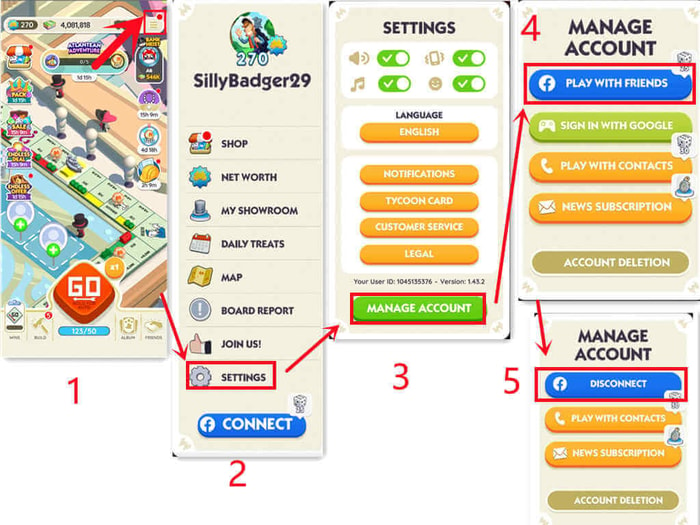
Note: If you see a “Disconnect” button, your Monopoly Go account is already connected to Facebook.
The brand-new season MONOPOLY Ever After has officially arrived, bringing a magical fairytale twist to Monopoly GO!