You can spend Diamonds in the in-game shop to buy exclusive outfits, weapons, mounts, pets, boosts, and other convenience items that help you progress faster.
Once your order is completed, we’ll send you an email confirmation. You can also check the order status in your MmoGah account dashboard.
No. We trade through the Auction House, which doesn’t require your login credentials — ensuring your account information remains private and secure.
We deliver Diamonds via the Auction House. After confirming your payment, we’ll purchase your listed item in the trading station. Please make sure your item information is accurate to ensure a smooth transaction.
Yes. If your Legend of YMIR Diamonds order hasn’t been delivered yet, you can request a refund. Our support team will process it promptly and professionally.
MmoGah is the best place to buy Legend of YMIR Diamonds. With over 15 years of experience in gaming currency trading, MmoGah offers competitive prices, fast delivery, and 24/7 customer support, making it the most reliable choice for players worldwide.
Legend of YMIR Diamonds are the game’s premium currency, allowing players to purchase high-value in-game items, cosmetics, materials, and upgrades directly from the store.
As you get deeper and deeper into D2R world, you'll be needing a lot of gold to buy potions, gear, and other items. The original game predicted we'd be smart-asses and store our gold in the stash, so we would lose stashed gold after death, but in Diablo II: Resurrected, we can store the gold in the shared stashes, and it won't be removed!
Every character has four stashes, each of which can hold 2,500,000 gold. But the amount that one character can hold in inventory increases at a constant rate of 10,000 gold per level. A brand-new level 1 character can hold up to 10,000 gold, and a level 10 character can hold up to 100,000 gold, and so forth.
No, you don’t. You only need to fill in your Battle Tag and Character Name/ PSN ID/ Xbox Gamer Tag/ Switch Friend Code, then we will deliver D2R Gold by sending you a friend request.
1. Choose the platform you are playing on.
2. Fill in your correct Battle Tag and Character Name/ PSN ID/ Xbox Gamer Tag/ Switch Friend Code.
3. Choose the D2R Gold delivery method: Face-to-Face.
Undoubtedly, we will try our best to finish your order as fast as possible, but sometimes we don't have enough D2R gold for your realm, so it might take a longer time.
1. Use the Trading Function: Please accept our trade request.
2. Drop and Pick Up: Please pick up the Diablo 2 Resurrected Gold we dropped on the floor.
We offer reasonable prices to you. Moreover, you can use a member discount (1-3%) and a coupon discount (3-10%) in one order to save your real money.
We can give you a refund before delivery if you need it. For example, we don't have enough supply of Diablo II gold, and you don’t want to wait, then we will refund you as soon as possible.
You can find a wide variety of Diablo II resurrected items here. Nevertheless, there are thousands of them in-game. We can not make sure that every D2R item is listed on our website. So if you can’t find the needed one, you can contact us, then we can add it.
If you have any questions or requirements, you can contact us via 24/7 online live chat.
There are a lot of chances to have discount coupons. When you buy a certain number of D2R items, you can directly get a discount. And when some holidays and festivals come, many special offers are also provided at MmoGah.
There are over 200 payment methods on our website. You can find your available one.
Sure, you can sell or trade your D2R items on our marketplace, but you should register first.
Normally you will receive the items within 10-30 minutes after we confirm your payment.
(1) Some items are special items that you can not put more than one in your personal inventory or bag, such as Gheed's Fortune, Annihilus, and Hellfire Torch. So you need to put them in the account share stash before buying them from us. Otherwise, you can not pick them up when we are trading.
For example, you have items like jewels, Runes, and an Annihilus in your inventory. To ensure a smooth delivery, please put the Annihilus in the account share stash before your purchase of it.
(2) Before trading, please make sure your inventory has enough space.
You can select Act 1 of Normal Difficulty for us to easily find you and thus deliver your items quickly. Please accept our Battle App friend request. Then we can travel to your room as soon as possible.
When you buy D2R items for PS5/PS4, Xbox, or NS, you need to add us as a friend. Please pay attention to your message prompt so that you can quickly add us to receive your items.
Yes, you can request a refund any time before delivery.
Certainly! If you're a new customer, you will receive a 10% coupon for your first order on our website. Once your total spending reaches 200 USD, you'll qualify for a VIP discount on all future orders, which ranges from 1% to 3% based on your VIP tier. Additionally, by completing missions, you can also earn discount codes that offer between 3% and 10% off your purchases. Don't forget to check for special promotions during major holidays, where you can enjoy significant discounts!
Most orders for BNS Neo Divine gems can be completed within 5 to 20 minutes after payment confirmation. However, larger orders might take a little longer to process. Additionally, a sudden increase in demand could lead to slight delays. We appreciate your patience and understanding as we work to fulfill your order as quickly as possible.
To know more about the Blade and Soul NEO Divine Gem delivery time, please check out this table.
We deliver BNS NEO Divine gems via the in-game Marketplace:
1. Please register an item for sale.
2. Set the register price slightly higher than the purchase price, with the last digit as a random number between 1 and 9.
For example, if you buy 5,000 gems, choose a register price between 5,001 and 5,009.
3. Set the register time to 12 hours.
4. Upload a screenshot showing the detailed stats of your item in the marketplace.
*Note that MmoGah doesn't bear any auction fee.
Buying Blade and Soul NEO gold at MmoGah is pretty simple:
- Select server and gem amount, then click "Buy Now" or the Shopping Cart.
- Enter item name, Register price, and Register time.
- Click "Pay Now" to complete payment and await delivery from the supplier.
The quickest way to contact us is through our 24/7 live chat or Support Email: support@mmogah.com.
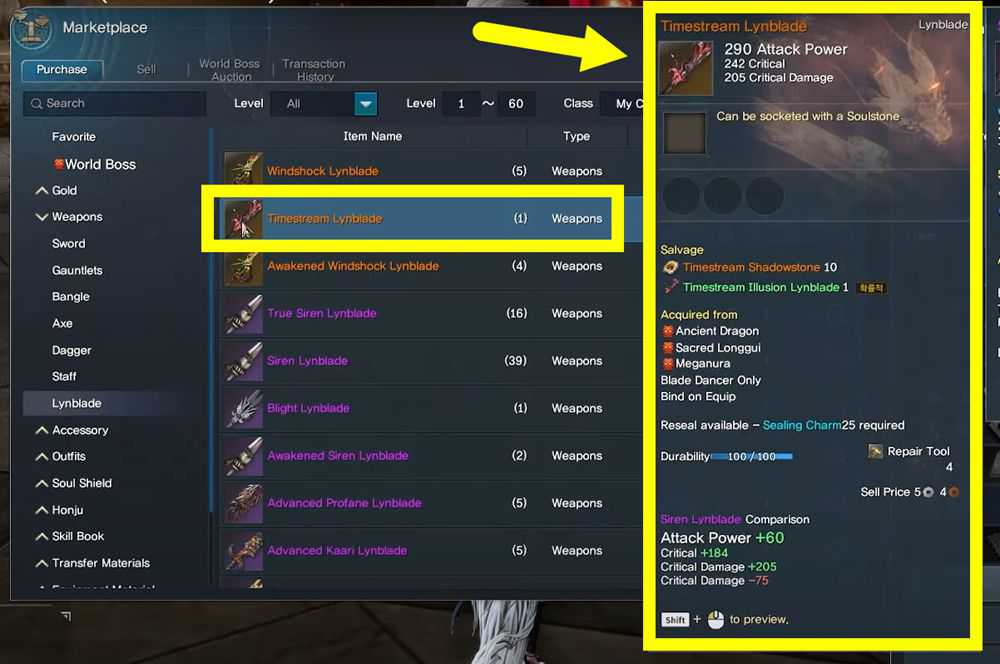
Please upload a screenshot that clearly shows the detailed stats of your item. For instance, if you have registered a weapon, the image should include stats such as Attack Power, Critical Damage, and other relevant information. This will help us locate your item in the Marketplace more efficiently.
If you try to log in to the game via the guest account while you don't enter the game that is logged in with the linked account, a "The account is already in use" message pop-up may appear. You can try the following steps:
1. Finish the tutorial using the guest account.
2. Sign out by going to Menu (☰) > Settings > Account.
3. The problem will be resolved when you reconnect the game with the linked account.
Select the desired target by tapping on it, then press the normal attack button to initiate an attack. When using the AUTO feature, tapping a target manually will activate both normal attacks and the assigned auto skills.
If you get stuck on the map or cannot use the controls to navigate, you can try the [Escape] button at [Menu] - [Settings] - Account].
You can use this feature up to five times.
If the issue persists, please contact Customer Support for assistance.
1. Open the menu (☰) and navigate Settings > Account > Customer Support.
2. Click [Game Guides] category
3. Select the category that best suits your situation in need.
4. Review the guide for possible solutions.
You can customize detailed settings for graphics, sound, and combat in the Settings menu.
Follow the steps below to check:
1. Open the Menu (☰) in the top-right corner
2. Select the Settings option (gear icon)
3. Game] - Shaky camera effect (during AUTO battle)
You can adjust detailed graphics, sound, and combat settings in the Settings menu.
Follow the steps below to check:
1. Open the Menu (☰) in the top-right corner
2. Select the Settings option (gear icon)
3. Game] - [Controls/collecting] - [Healing Potion use during the AUTO battle]
You can customize push notifications and alerts as follows:
1. Open the Menu (☰) in the top-right corner
2. Select the Settings option (gear icon)
3. Click the [Alert] button and adjust the settings
AUTO Battle mode allows your character to continue automatic combat after you log off the game. You can activate AUTO Battle mode only while in automatic combat, and the maximum AUTO Battle duration is 8 hours per session.
Note: The AUTO Battle time resets daily at 4:00 AM.
You can save a location in the field Hunting Ground by clicking the "Pin" icon on the game screen's left side. To teleport to the saved location, you must use Blessed Teleport Scrolls.
When you sell an item in the Trading Post, the amount you receive will be the sale price minus the transaction fee. The transaction fee is 5% of the sale price, and you can view this fee when you list the item for sale.
To quickly return to the town, click the [Return] button, which looks like a house, on the left side of the game screen. Remember that this option is only available if a Flying Mount is equipped. You can check your mount status via Menu > Mount.
Yes. This new version includes a full wipe of world data, characters, progression, and inventories, giving all players a fresh start.
You can buy Quinfall gold coins by selecting your game from our site's Quick Buy, Gold option, or Search Box. Select the Platform you are playing on, choose the amount of gold you want, upload your listed item image, and then complete the payment process.
You can maximize your savings by taking advantage of multiple discounts: bulk discount and coupon discount at the same time.
If you have any problems with your order, please contact our customer support team for assistance.
We support 200+ options, such as credit/debit cards and other online payment options.
Yes, we have a refund policy in place. Please refer to our terms and conditions for more details.
The majority orders of The Quinfall gold coins are completed within 5-30 minutes.
Partial deliveries can happen during peak times. If you receive only a portion of your gold, simply contact Live Chat, and we will complete the remaining amount as soon as possible.
When you purchase caps, you should choose your console first, and make sure to fill in your correct PSN ID so that we can add you as a friend in the game, and enter your world. You should sell us an item for the amount of caps you purchased, and we buy your item with caps, so you’ll receive your fallout 76 caps directly. You can use them to buy food, water, weapons, or materials from traders.
Face-to-Face:
1. We will add you as a friend in the game, please accept our friend request.
2. We will enter your world and move quickly to your side, so you just need wait in the place.
3. We will initiate a trade request with you. You should sell us an item for the amount of Caps you purchased, and we buy your item. (You'd better sell us a piece of ammo, so that we can find it easily)
We have a vast supply of caps to guarantee fast delivery time for all consoles: PS4, Xbox One and PC. We will try our best to complete your orders as fast as possible after we have received and verified your payment. If you are online, most orders can be finished in 30 minutes.
As soon as you sign up as a member on our website, you'll get a 10% coupon.
We promise Refund before delivery and you don't need to worry about it. If we don’t have enough supply of fallout 76 bottle caps for your console and you wouldn’t like to wait, we will deal with your refund immediately without any delay.
MmoGah is a Golden Brand in the gaming industry. We have more than 10 years’ experience in the gaming industry, allowing thousands of gamers to have fun fast. We do this by providing a safe marketplace for virtual currency and gaming services via our professional sellers.
Buying from a game currency seller is the fastest way to get Fo76 Caps. This method allows you to obtain a sufficient number of caps in a short period without any effort. MmoGah is a professional game currency seller known for offering the most affordable and safest caps.
Yes, you can. MmoGah has been providing currency services for Fallout 76 for many years and has served numerous players. Based on our extensive sales experience in this game, we have never had any customers get banned or have their caps removed. You can purchase with confidence.
If you reach the 40,000 cap limit in the game, you should consider spending your caps on valuable items, trading with other players, or investing in their CAMP to avoid hitting the cap ceiling.
In Fallout 76, the maximum number of caps a player can earn daily from vendors is 1,400 caps. This cap resets every 24 hours, so players can continue to earn caps by selling items to vendors each day.
We trade Darker gold through Trader’s Guild. After entering the channel we designated, please put a random and useless item in the chat box, and we will buy the item with the gold you purchased on our site.
Sure you can. We have a platform where you can sell in-game assets to other players, which is easy and convenient. See this selling guide to sell gold on MmoGah.
First, your character has to be at least level 10. Second, you have to pay an initiation fee of 25 gold to become a trader. After you become a trader, you can start trading by selecting any of the channels from the Channel List for items categorized at left side. Here, we will tell you a channel. After joining the channel, you can link an item in the trade chat by holding SHIFT and clicking on an item in your inventory. Last, each transaction needs a commission of 15 gold from both parties.
Except for the member discounts (1%-3%) and the large order discounts, we also provide larger coupons from 3%-10% and holiday coupons when there is a holiday.
Most orders can be complete within 4 minutes to 12 hours.
Yes! Although Last Epoch doesn't directly sell gold through its store, you can acquire cheap Last Epoch Gold from reputable providers such as MmoGah.
In general, the gold prices for the Hardcore mode can be higher than the Standard mode, as fewer players are there. Also, when a new Cycle season starts, the prices for League servers can be higher due to the changes in demand.
Navigate to the game's “My Stall” menu and select “List an Item”, then choose an item you want to sell to us. Favor cost will be applied based on the item's quality. We recommend blue or yellow items, as they cost the least Favor.
You can contact us via our Live Chat, support email, or Discord. Our reps are online 24/7 to help you with any inquiries or issues you encounter.
Sure, you can sell your gil to us and become our supplier. Please contact us via suppliers@mmogah.com.
The safest and most reliable method is using the official in-game Trade Market. At MmoGah, we deliver Diamonds by purchasing the item you list on the Trade Market. This avoids account sharing and follows the in-game trade system, keeping your account secure.
No. MmoGah never asks for your account login or password. You only need to list a specific item on the Trade Market. We then buy it with the Diamonds you purchased. This keeps your account 100% safe.
To ensure a smooth trade, follow these steps:
Choose a low-value item to list.
Leave the exact item name when placing your order.
Set a price that matches the Diamonds you ordered.
Select “YES” for Show Seller Information so we can locate your listing easily.
The buyer (MmoGah) covers all Trade Market taxes. You will receive the full amount of Diamonds based on the item price you set—no hidden fees or deductions.
MmoGah uses legit, in-game trading methods like the Trade Market, which minimizes risk. We never ask for account access, making the process much safer. However, any real-money trading carries some risk, so always use trusted platforms with proven safety records.
Most orders are fulfilled within 15–30 minutes after confirmation. Larger orders may take slightly longer. Our support team is online 24/7 to ensure fast and reliable delivery.
No. All trades are server-specific. Diamonds and items can only be traded within the same server and region (e.g., SEA, NA, or KR). Please make sure you select the correct server when placing your order.
The first expansion is Mists of Pandaria (Mistblade realm), which releases on January 7, 2022.
The second expansion is Wrath of the Lich King (Netherwing realm), which was released on Mar 25, 2023.
It's a realm where you can acquire a bit higher (x3) XP rates than usual to make the process less time-consuming.
Mistblade vol.2 is the latest season and is another chance for players to discover the wonders of Pandaria.
Not every transaction is 100% safe or without any risk, but our customers' accounts have a very low rate of getting banned. You can do some things to make it much safer:
1. Choose a safe delivery method.
2. Choose a reliable website, like MmoGah.
You can use the large order discount and coupon discount together for one order.
Most orders are typically completed within 5 to 30 minutes.
1. Face-to-Face (Recommend): We deliver the gold to you face-to-face in the game. Please keep your character online.
2. Mailbox: we send the gold to your character’s Mailbox in the game.
For customers who choose the Mailbox delivery method, please make sure not to click the "Return" button on the Mail of the received gold. Use it as quickly as possible.
There are more than 200 payment methods on our site you can use, which make your purchase convenient.
Vigor is the main currency in Lords of the Fallen. You need Vigor to improve your character’s attributes, such as health, stamina, energy, strength, agility, and faith. Also, you can use Vigor to buy items from merchants, such as potions, runes, spells, and armor.
Skull Scrapers, which are the quickest weapons, are dropped by Rogues.
Go to the Vestige, kill the penitent and pilgrims, and switch to the Umbral world. Umbral creatures like Husks will keep appearing here. The more time players spend in the Umbral, the more Vigor they can get.
More than 90% of LotF orders are completed in half an hour or less.
For this game, we produce the items ourselves, so we have plenty of sufficient stock. So after you place an order, please stay online. We will contact you soon.
Don't worry, if you find we delivered the wrong item to you, you can contact our online customer reps to make it corrected. Our customer service is available 24/7 online to serve our customers.
Of course, you can. If you need to buy multiple items, you only need to find the items you want and add them to the shopping cart. When you have selected all the items you want to buy, click on the cart, and then checkout.
Sorry, you can’t. You can only choose one platform to buy items at a time.
To purchase CatsEyeXI Gil, simply:
1. Visit the CatsEyeXI Gil page on MmoGah.
2. Select the amount of Gil you wish to buy.
3. Enter your character's name at checkout to ensure correct delivery.
4. Choose your payment method and complete the transaction.
Gil is essential in CatsEyeXI for various activities such as purchasing equipment, buying consumables, trading with other players, crafting, and even transportation. Buying Gil can save you time and enhance your gaming experience.
MmoGah has over 15 years of experience in the gaming market and has built a high reputation for providing secure transactions, competitive prices, and excellent customer support.
We offer a refund guarantee if we cannot fulfill your order promptly or if you decide to cancel before delivery.
We support over 200 payment methods. The available options will depend on your region and preferences. You can select the most suitable payment method during the checkout process.
We use the Island Drop-Off method to deliver all the Animal Crossing products, including ACNH Bells, Nook Miles Ticket, and all ACNH Items. A supplier will fly to your island once we have your 5-digit Dodo Code, and all things will be dropped on your island and left for you to pick up. Sometimes, the supplier need to fly multiple times to deliver all the items, so please keep your gate open until the supplier has delivered all the things you bought.
Yes, it is. In-game trades are unavoidable between players. Until now, no customer has been banned for buying Animal Crossing Bells, Nook Miles Ticket, or ACNH Items at MmoGah.
Below are the answers you need to choose when getting Dodo code from Orville who is the NPC at Dodo Airlines: I Want visitors → Via online play → Roger → Invite via Dodo Code → the more the merrier → Yeah, invite anyone. Note that you need to play the entire 1st in-game day to unlock the Dodo Airlines area.
Gold Nuggets can be sold to Nook’s Cranny for 10,000 Bells each.
No. They are not 100% the same. Many of the Theme Rooms are decorated through our own creations.
MmoGah supports various secure payment methods, including Paymentwall, Visa, Google Pay, and more.
MmoGah offers customer support 24/7 to assist with any issues. If something occurs to you and you don’t want the gold anymore, we can refund you before delivery.
Farming gold can be time-consuming and tedious. Buying gold allows you to skip the grind and focus on enjoying the game, especially in high-difficulty modes where you might lose items purchased with hard-earned gold.
Yes, MmoGah is a trusted platform with a good reputation among gamers. MmoGah emphasizes secure transactions and uses secure payment methods to protect your personal and financial information.
Most orders can be completed within one hour. It can delay when our supplier is not online or your screenshot is not right or not clear.