
Lost Ark: World Tree Leaves Collectibles Guide
How to collect World Tree Leaves in Lost Ark through life skills, merchants and quests, plus every reward from 6 to 120 Leaves.
Like other MMO games, Lost Ark settings are plentiful. Some settings can help you play your game easier. While some of these are pretty simple, some obscure options can help you solve problems in the game. This guide will show you the best and recommended settings for a better Lost Ark life. Let's dive in!
Video Settings can affect graphics quality and overall game performance.
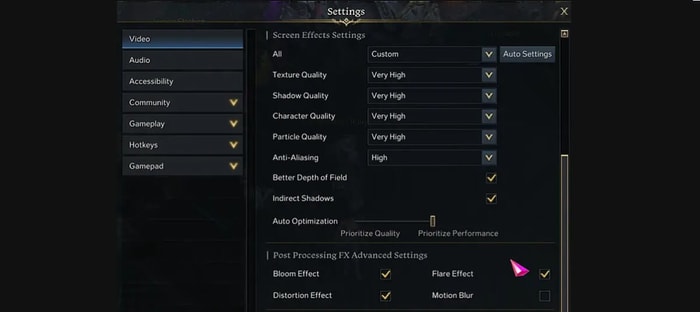
You can force a change of your aspect ratio in the options. In the screen resolution menu, clicking the force aspect ratio options will make you use a 21:9 aspect, even if you use a 16:9 ratio monitor. This option can be useful for raids like Brelshaza that require a wide view. But if your monitor is already 21:9, it doesn't matter whether this is on or off.
Like other games, Lost Ark also has the representative frame-dropping options: Shadow quality and Particle quality. If you have a high-quality performance PC, you don't have to lower those options. But if you use a little lower-performance PC, dropping those two options can help your LoA journey.
Tip: Turning off the Auto Optimization options can boost your gaming experience, and turning on the out focusing option will boost your quality performance.
In this option, turning off Bloom Effect, Flare Effect and Distortion Effect can help to boost your performance, except for the Motion Blur.
Accessibility Settings affect how your Cursor is displayed, Colorblind Filters and Photosensitivity mode. Some of them can help the majority of players.
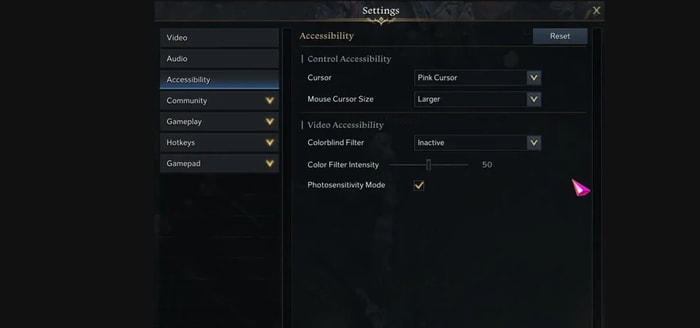
You can change the Cursor size and color in the Control Accessibility tab. There is also a shortcut to change the color of your Cursor fast: by pressing Ctrl + Wheel.
Gameplay may be the central part of this article.
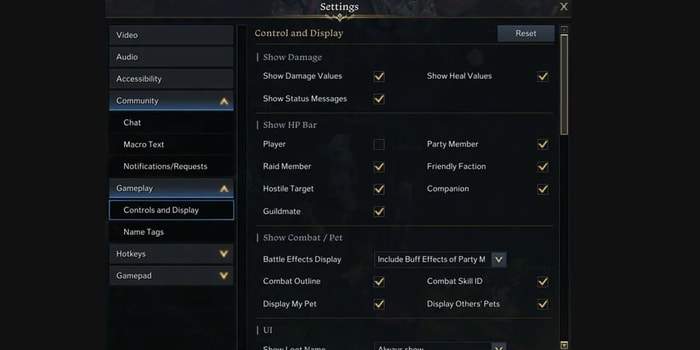
The control and display tab is the most important one in Gameplay Settings. There is one important effect vector called combat/pet. From there, you can set the battle effect display of your environment. It is important because some effects can cover the pause rate and attack range during gameplay. Of course, turning off all effects can provide beautiful gameplay, but it is also risky.
Warning: Turning down some of the effects can be crucial for your survival during the raid.
Below this option, you can also find the back and head indicator color setting. Instead of playing with the default color of the back and head direction of the boss, you can change the color to a more recognizable color. With this option, you can catch the back or head of the right bosses.
In the same tab, you can find your own HP bar display. It might seem weird to set those things, but it will improve your visibility during gameplay, so you can choose to turn it on.
In the combat settings tab, turning off the skill screen shake is recommended for players who feel dizzy when skills are used. Personally, though, this one is not recommended because it's not cool. One setting is like a common manner: skip dungeon cut scenes. Check this thing to auto skip the unnecessary cut scenes before starting the raid.
You can minimize those loot drop alarms in the gameplay tab. You can set them smaller and make them look simple. Try to set those alarms if you are annoyed about them.
Lost Ark's control scheme is pretty good by default. But I want to highlight one option: 'Attack with Right-Click.' The Left and Right Mouse Buttons' functions will be switched by selecting this option. It's an unnoticed option, but it will be very useful if you're not used to what comes with the default system.
On a lower-performance PC, drop Shadow quality and Particle quality. Turning off Bloom Effect, Flare Effect and Distortion Effect in Post Processing FX Advanced Settings can also help to boost your performance.
Yes. Clicking the force aspect ratio options in the screen resolution menu makes you use a 21:9 aspect even on a 16:9 ratio monitor, which is useful for raids like Brelshaza that require a wide view.
Press Ctrl + Wheel. You can also change the Cursor size and color in the Control Accessibility tab.
Check the skip dungeon cut scene option in the combat settings tab to auto skip the unnecessary cut scenes before starting the raid.
It switches the functions of the Left and Right Mouse Buttons. It is found in Hotkey Settings.
How to collect World Tree Leaves in Lost Ark through life skills, merchants and quests, plus every reward from 6 to 120 Leaves.

A Lost Ark Elixir System guide covering how to acquire, craft and refine Elixirs, effect types and the Maxroll.gg simulator.

A PvE Wind Fury Aeromancer build for Lost Ark: skill build, engravings, combat stat targets, gems and gear, built around Swiftness and Reversal skills.

How Lost Ark bracelets work: where to obtain them, how re-rolling and locking effects works, upgrading from relic to ancient grade, and choosing stats by class and role.