EVE Echoes ISK is the official currency in the game EVE Echoes. It is very important and has many uses, and no one doesn’t want more ISK, so please follow us in this guide to learn more about Planetary Production. We hope it can give you the very best start possible in EVE Echoes.

This guide was written in 2020, so some details may have changed since.
Key Takeaways
- Planetary Production needs no specific ships and makes a great little side income for anyone playing EVE Echoes.
- Lustering Alloy is a really basic material used in a lot of things, and a good pick if you only have a couple of arrays.
- Log in at least once every 24 hours and hit the plus symbol to keep your arrays mining.
- The higher the system's security, the lower and slower the yield: a negative 0.6 nullsec system harvests far faster than a 0.8 high-sec one.
- Planetology is the only skill you need; the advanced tutorials give you a skill chip for it that refunds points already spent.
The video is from Captain Benzie, who shares detailed tips on planetary production in EVE Echoes. The content is written in the first person, from his point of view.
What Is Planetary Production?
Planetary Production is a form of resource gathering that you can use for manufacture. Unlike mining, it does not require any specific ships, and it makes a great little side income earner for anyone playing EVE Echoes. We are going to talk about how to set up planetary production mining arrays, what kind of ores you should be looking for, what skills will benefit you in doing this and, of course, how to actually do it.
Choosing a Planet and a Material
If we open the main menu and head right down to the Planetary Production icon, you will see that this little screen shows you each particular planet in the sector, and there is some really cool stuff on this screen. You can tap for info and get an idea of everything about a planet, like someone who sits there and stares at the night sky.
N7-BIY 1 is a lava planet, and it will give Glossy CompoundFound on lava planets such as N7-BIY 1Medium volume there, Heavy Metals, Noble Metals or Polyaramids. Next to those you will see the volume that you can mine there: Glossy Compound has a medium amount, Heavy Metals is medium, Noble Metals is poor and Polyaramids is rich. As we look down the different planets in the system, you will see that they are all of different types, like barren planets and lava planets, and they will all have different yields and possibilities for the minerals that you can find on them.
A temperate planet such as N7-BIY6 has Opulent Compound or Condensates at perfect. The higher the quality, the more you will get per yield and the quicker your mining arrays will manage to fill up. Let’s have a look at what else it has: Fiber Composite, Reactive Metals, Coolant and Lustering AlloyA really basic material used in a lot of thingsA good choice with only a couple of arraysA good one if you do this as a side job. Lustering Alloy is actually a really basic material used in a lot of things, so that’s probably the one we’re going to go for here.
Tip: I would recommend Lustering Alloy if you have only got a couple of arrays. If you are doing this as a side job, it is also a good one.
Placing a Development Array
So we are going to hit Place a Development Array. This will put a development array on this particular planet. The higher your planetary skills, the more planets you will be able to mine on. At the start, you can only put an array down on one planet, but skills will eventually allow you to populate two planets, and I think actually more as you get up through advanced and expert.
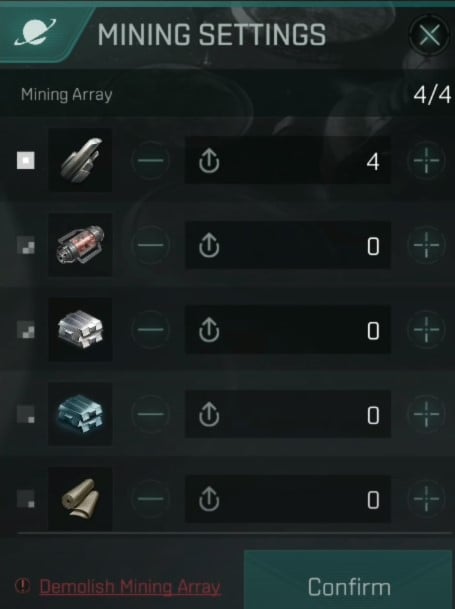
Once you've got an array placed, you can then choose how to set up that array by using the plus and minus arrows. If I wanted to just kind of mess around and have little bits of all of those materials, that's how I could set it. Of course, I'm going to set that to the full four on that Lustering Alloy at perfect. I'm going to hit confirm on that now, and as you can see, it will immediately start to perform the mining of that Lustering Alloy. It says no inventory, but that is slowly starting to fill up.
Now, this particular array, as you can see, will keep mining for the next two and a half hours, which means you can't just leave here, go on holiday, come back and expect there to be a load of stuff here.
Warning: What you need to do is log in at least once every 24 hours and hit that little positive symbol there, and suddenly, bam, we're up to 24 hours, which will count down here.
As you can see, I have now finished mining my first Lustering Alloy. We are not going to launch that yet; it's kind of pointless to go all the way out there just to collect one. This happens over time, so again: log in, get to that screen, hit that plus sign, refresh it if you need to, and then you can go and collect anything that has been harvested. I'm going to skip ahead to when this has actually managed to harvest a decent amount for us.
Now, of course, if we go back to the mining settings, down at the bottom you have Demolish Mining Array. If you want to change which planet you are mining, then 100% that is what you're going to need to do. You will need to hit Demolish Mining Array, which will take it apart, and you can then go to a different planet and select that one.
Once you've got an array going, it also appears at the top left of the Planetary Production menu as a kind of bookmark. We're at Lustering Alloy 4, which makes me happy. You do need to be in the system itself to claim this and to set it up.
Obviously, if you want to start jumping around different systems to have a look at what is in nearby regions, you should 100% do that: go scouting out different regions and different systems finding what you need. If there's a particular material or mineral that you're looking for (for example, you've got your blueprint, you're having a look at it and it says you actually need more Base Metals), then have a look around the different systems in your area and find one with a base metal.
How Security Level Affects Your Yield
It's also worth noting at this point that the security level of your system does massively influence how much you yield from a planet. The higher the security, the lower and slower that yield ultimately is. That means that out here in N7-BIY, being a negative 0.6 system, planetary production arrays are particularly lucrative. They do actually harvest at quite an astonishing rate. If I go back, you will see that we are now already at Lustering Alloy 6. If I were in, say, a 0.8 system up in high sec, I probably would only have harvested the one by now. That is a big, important difference to note.
Note: Lower-security systems give faster planetary production yields: a negative 0.6 system harvests at quite an astonishing rate compared with a 0.8 high-sec system.
Planetology Skills
So planetary production is clearly something you're interested in. You will want to know how you then increase your yields and your skills. If we go across into our industrial skills, we can have a look at all the different parts here, and I have got to find which one it's under. Here we are: Planet Management, PlanetologyThe only skill you need for planetary productionA skill chip comes with the advanced tutorialsThe chip refunds points already put in.
You do actually get a skill chip for Planetology as part of the advanced tutorials, so it is worth making sure that you do get to that advanced tutorial and do it. Even if you do decide to train Planetology before then, that skill chip will refund any points that you've put in. So if, like me, you go up to Planetology three and then get that skill chip and use it, it will refund the points that you already put in, which is a very useful thing.
Tip: Make sure you get to the advanced tutorial and do it: its Planetology skill chip refunds any points you have already put into the skill.
Let's have a look at what this skill actually does. If we open it up and tap on the three lines, that gives us the skill effects.
- At level one, planetary production launch time is sped up by 10 percent, so it's faster to launch. You'll see what that is in a moment: when I go to launch later on in this video, you'll see that you have to launch and it does take a brief period of time before the launch actually happens, and this makes it go faster. It also increases the cargo hold by plus 20 percent, so you can have more in there to actually launch.
- Then, as you go down, level two adds an extra mining array. You saw that when I set it up I had four; you will only have two at the beginning, and once you hit level two of Planetology, that increases the mining rates by plus one, giving you the option of three.
- At level three, that goes up to plus two, which is how I've got four. I get a 30 percent increased launch speed, and my cargo hold is twice the size of a standard cargo hold.
- Once I hit level four, that becomes 150 percent with a 40 percent speed, and I can now mine an additional planet. You can see their maximum development planets at level four is plus one, which means I'll be able to mine two separate planets, with a total of five mining arrays on each of those.
- Level five then gives us a couple of extra boosts, but not an extra planet yet. Once you hit it, you can have 50 percent extra speed, you can be mining on two planets with a total of six mining arrays, and your cargo hold is three times the size of a standard cargo hold, plus two hundred percent.
Of course, once Planetology is done, you can go into Advanced Planetology. It's more of the same, but obviously at higher levels, and you do need to be an Omega level clone for that to be active. If Planetology is something that you're interested in, it is well worth doing.
That is the only skill you need for this. There's literally nothing else to it, which makes it a great little side gig. If, like me, you're mainly focused on combat, this just gives you something that you can do passively in the background, and I do recommend that every character does it, whether you skill into it or not. Do it, collect those resources, gather them up and eventually sell them on the market. That helps everyone, and it earns you a little bit of extra ISK as well.
How to Collect Your Resources
The final thing to talk about with planetary production is, of course, how to actually pick it up. If we go back to the Planetary Production menu, you'll see that we've got our array out here on the planet with the option to launch it. That is what we're going to have to do, and this will take a brief period of time, anywhere from a matter of seconds up to a couple of minutes, as you can see here, based on how much you are ejecting into space.
Warning: It is vital at this point that you set the container as a destination and aim to get there as quickly as possible. Especially out here in nullsec, there is every possibility that the container, once it's in space, is going to be someone's target to loot. They can come out and grab it.
You've seen that I almost did that to poor old Gen Silos in our corporation.
Having undocked, you can see that it then autopilots us straight out to the area where the container has been jettisoned. When I get here, if I open up the loot, we will see that it's not actually here yet. Oh no, it hasn't launched. There we are, it has launched. I can immediately open that, loot it and take it with me. You can see here that Drizzle, one of the guys from the Catskill Cartel, has his container out here as well. If I wanted to be really rude, I could actually go and approach that and loot it. That said, of course, I'm not going to do that; I'll let Drizzle come and claim it himself.
Final Thoughts
Anyway, this should cover everything that I need to mention about planetary production, so hopefully it will give you an insight into what you should be doing in order to actually start harvesting minerals from planets. This is one of the biggest gateways to industrialism and manufacturing, simply because it is time gated. You can't just sit there and force a load of Lustering Alloy, or whatever it is; you do have to set up that array and then wait for it to go, or of course buy it on the market. Hopefully the content answers some questions.
FAQ
What is Planetary Production in EVE Echoes?
Planetary Production is a form of resource gathering that you can use for manufacture. Unlike mining, it does not require any specific ships, so it makes a great little side income earner.
How often do I need to log in to keep my mining arrays working?
At least once every 24 hours. Hit the plus symbol in the Planetary Production menu to refresh the 24-hour countdown; otherwise the array stops mining.
Does system security affect planetary production?
Yes. The higher the security, the lower and slower the yield. Arrays in a negative 0.6 nullsec system harvest at quite an astonishing rate compared with a 0.8 high-sec system.
Which skill do I need for planetary production?
Planetology is the only skill you need. Each level adds launch speed and cargo hold size, levels two and three add mining arrays, and level four allows an additional planet. Advanced Planetology follows and requires an Omega level clone.
How do I collect the resources from a planet?
Launch the harvested resources from the Planetary Production menu, set the container as your destination and get there as quickly as possible, especially in nullsec, where other players can loot it.
How do I move my array to a different planet?
Go to the mining settings and hit Demolish Mining Array at the bottom. This takes the array apart, and you can then select a different planet.
MmoGah will continually share more tips and guides for EVE Echoes with you, so please stay tuned to our EVE Echoes News Channel.